
Google Ads Not Converting? Here Are the 5 Real Reasons (And the Fixes)

You check your Google Ads dashboard on Monday morning. Clicks are up. Impressions look healthy. Spend is exactly where you set it. But the conversions column reads zero, again. You adjust the bid. You rewrite a headline. You increase the daily budget. Nothing changes. The traffic keeps coming and the leads keep not coming.
The problem is almost never what you are looking at. Most small business owners focus on what is visible in the dashboard: bids, impressions, CTR. The real conversion killers sit one level deeper, in tracking setup, keyword intent, landing page alignment, and campaign data thresholds that nobody mentioned when you turned the ads on.
This post covers the five most common reasons your Google Ads are not converting and the specific fix for each one. If you have active campaigns spending real money right now, you will likely recognise at least two of these before you reach the end.
Google Ads stop converting when one or more parts of the campaign chain break down — most commonly because conversion tracking is misconfigured, keywords are attracting the wrong traffic, ad copy does not match what the landing page delivers, or the landing page is not built to convert. Fixing these issues does not require a bigger budget. It requires a cleaner system.
The most common reasons Google Ads are not converting:
- Broken conversion tracking: If Google cannot see your conversions, its AI has no data to optimise against and performance deteriorates quietly.
- Keyword intent mismatch: Broad or informational keywords attract browsers, not buyers, and you pay the same cost per click for both.
- Ad copy and landing page disconnect: When your headline promises something the landing page does not deliver, visitors leave in seconds.
- Homepage as landing page: Sending paid traffic to your homepage instead of a focused landing page is one of the most common and costly PPC mistakes.
- Underfunded or impatient campaigns: Google’s AI needs 30 to 50 conversions per month to optimise properly. Below that threshold, Smart Bidding is essentially guessing.
- Poor mobile experience: 63% of Google Ads clicks come from smartphones. A slow or hard-to-use mobile landing page loses more than half your paid traffic before they convert.
1. Your Conversion Tracking Is Broken and You Do Not Know It
What it means: Broken conversion tracking means Google Ads is recording clicks and spending your budget, but the system has no way of knowing which clicks turned into actual leads or sales. Without that feedback loop, Google’s Smart Bidding algorithm has nothing real to learn from.
Why it costs you money: When Google’s AI cannot see your conversions, it optimises for the wrong signals. It starts chasing clicks from people who look like past visitors rather than people who look like past converters, because it has no data on who actually converted.
In almost every account we audit that has been running for more than 60 days with no conversions showing, we find either a tag that never fired correctly from the start or a conversion event that stopped recording after a website update. A marketing manager at a growing services firm might have set up conversion tracking in year one, had a developer update the site theme six months later, and never noticed the tag silently broke. She has been optimising her bids against ghost data ever since.
How to check right now: Open Google Ads, go to Tools and Settings, then Measurement, then Conversions. Look at the Status column for each conversion action. If it says “No recent conversions” or “Unverified,” your tracking is broken. This takes under two minutes and costs nothing to check.
The Tabula fix: Every campaign audit Tabula runs starts here before touching a single bid or keyword. We verify that conversion tags are firing correctly on the right pages, that phone call tracking is active where relevant, and that Google’s data matches what the client sees in their CRM. A campaign built on accurate conversion data and one built on broken data are not the same campaign, even if every other setting looks identical.
2. You Are Targeting the Wrong Stage of the Buying Journey
What it means: Keyword intent mismatch happens when your ads appear for searches from people researching a topic rather than people ready to hire or buy. You pay the same cost per click for both types, but only one was ever going to convert.
Why it drains your budget: Around 65% of small and mid-sized businesses run Google Ads, and the most common money-wasting mistake across all of them is bidding on broad, informational keywords with no buying intent. Someone searching “how does PPC work” is not the same prospect as someone searching “PPC management agency Toronto.” The first wants an education. The second wants to hire someone this week. A trades business owner running ads on “home renovation ideas” gets floods of clicks from homeowners browsing inspiration with no project timeline and no budget decision made. His cost per click is real. His conversion rate is functionally zero.
How to check right now: Open your Search Terms report in Google Ads under Insights and Reports, then Search Terms. Read the actual queries that triggered your ads in the last 30 days. If more than 20% contain words like “how,” “what,” “why,” “ideas,” or “examples,” you are paying for informational traffic with no commercial intent.
The Tabula fix: Tabula’s keyword strategy for paid campaigns is built around commercial and transactional intent from the first brief. We build tight, intent-specific ad groups, pair them with robust negative keyword lists to filter out informational queries, and audit the search terms report monthly to catch new irrelevant traffic before it compounds. Understanding how to optimize your paid advertising starts with knowing exactly who you are paying to reach. If you are weighing whether paid search is even the right channel for your stage of growth, our breakdown of SEO vs PPC — which is right for your business covers the decision clearly.
3. Your Ad Copy and Landing Page Are Having Two Different Conversations
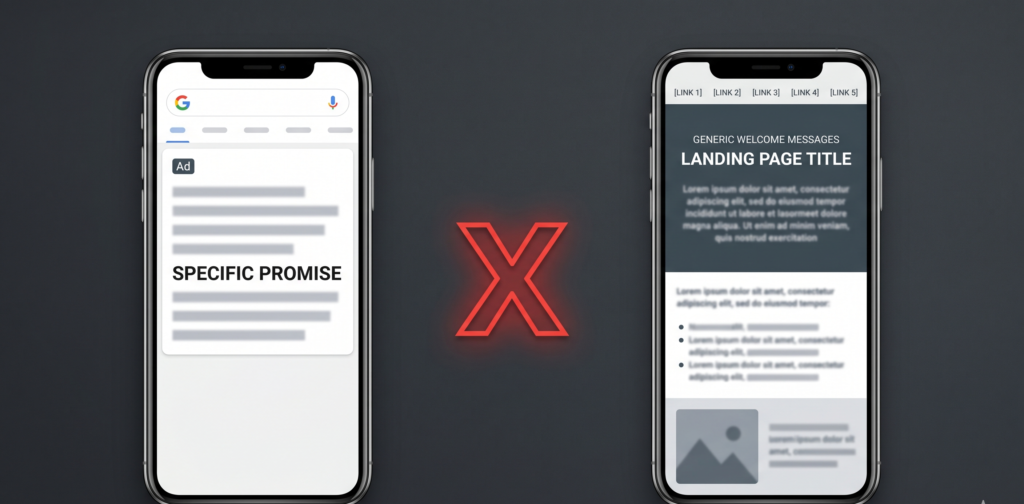
What it means: Message mismatch happens when the promise your ad makes and the experience your landing page delivers do not align. Visitors arrive with a specific expectation and leave within seconds when that expectation is not met.
Why it kills conversions: Website conversion rates drop 4.42% for every additional second of load time, but slow speed is only part of the problem.
The bigger issue is the gap between what the ad says and what the page shows.
A user who clicks “Get a free marketing audit today” and lands on a generic services page with no audit offer visible will leave. Every time. A gym studio owner might run an ad promising “First month free, no commitment.” The offer gets strong clicks. But the landing page sends traffic to the main website, which lists all membership tiers with no mention of the free month and a contact form buried at the bottom. The conversion never had a chance.
How to check right now: Open your highest-spending ad. Read the headline and offer it makes. Now open the landing page URL that ad sends traffic to. Ask one question: if you had never heard of this business and landed on that page after clicking that ad, would the offer from the ad be immediately visible without scrolling? If the answer is no, you have a mismatch.
The Tabula fix: Every campaign Tabula builds includes dedicated landing pages matched specifically to each ad group, not the homepage. The headline on the page mirrors the promise in the ad. The CTA matches the specific action the ad requests. Our resource on landing pages that convert paid traffic walks through the exact structure we use for every paid campaign we run.
4. Your Campaign Does Not Have Enough Data to Optimise
What it means: Google’s Smart Bidding strategies — including Target CPA and Maximize Conversions — rely on machine learning that requires a minimum volume of conversion data to function correctly. Below that threshold, the algorithm is not optimising. It is guessing.
Why patience and budget directly affect performance: Google recommends a minimum of 30 to 50 conversions per month per campaign for Smart Bidding to exit its learning phase and produce stable results. A small business spending $500 per month on a campaign with a $120 cost per conversion will generate roughly four conversions a month.
Smart Bidding needs at least eight times that volume to calibrate properly. The campaign never stabilises, performance stays erratic, and the owner concludes Google Ads simply does not work for their business, when the real issue is that the learning phase was never completed. We have seen this pattern in almost every account where a business abandoned paid search after two or three months with no results.
How to check right now: Check your Google Ads campaign status. If it shows “Learning” or “Limited,” the algorithm has not finished calibrating. Then check your monthly conversion count. If it is below 30 per campaign, your Smart Bidding strategy is operating without enough data to work as intended.
The Tabula fix: When a campaign lacks the conversion volume for Smart Bidding, Tabula uses manual CPC bidding during the early phase to maintain control while data accumulates. We also configure micro-conversions, such as phone clicks, form starts, or time-on-page thresholds, as supplementary signals so Google’s AI has more data points to learn from even before full conversions are confirmed. This bridges the data gap without inflating the budget.
5. Your Landing Page Is Not Built for Mobile and Most Clicks Come From Phones
What it means: If your landing page was designed for desktop and has never been specifically tested and optimised for mobile, you are throwing away the majority of your paid traffic. Mobile is not a secondary device for Google Ads users. It is the primary one.
Why this costs more than you realise: 63% of all Google Ads clicks come from smartphones, yet desktop still converts 8% better than mobile on average according to Unbounce’s Conversion Benchmark Report. That gap exists almost entirely because most landing pages are not built with mobile users in mind. A long contact form that is painful to complete on a small screen, a headline that requires scrolling to read, or a CTA button sitting below the fold on a phone are each enough to kill a conversion.
A professional services firm might run a technically solid campaign with great keywords and strong copy, but 70% of their clicks come from phones and the landing page has a seven-field contact form nobody fills out on a bus. The campaign looks like it is underperforming. The real problem is a form never designed for the device most people are using.
How to check right now: Pull up your landing page on your phone, not a desktop simulation. Time how long it takes to load. See if the CTA button is visible without scrolling. Try to complete the contact form. If any of those steps feel slow or frustrating, your mobile experience is losing conversions every single day.
The Tabula fix: Every landing page Tabula builds is mobile-first by default. We design for the phone before the desktop, test load speed using Google PageSpeed Insights, keep forms to three fields maximum for mobile audiences, and make the CTA the first visible element after the headline. Building a multi-channel marketing strategy for small businesses means every channel, including paid search, works on the device your audience actually uses. And if your overall marketing spend needs to work harder across every channel, our guide oncost-effective marketing channels shows how paid and organic channels compound together.
Google Ads not converting is almost never a budget problem. It is a system problem. Broken tracking, mismatched keyword intent, disconnected landing pages, insufficient campaign data, and poor mobile experience each quietly drain campaigns that could otherwise perform well. Fix the system and the same budget produces very different results. If you are spending money on Google Ads right now and not seeing the conversions to match, a structured audit is the right first step. It identifies exactly where the breakdown is, which means every fix targets the real problem instead of the visible one.
Frequently Asked Questions
How do I know if my Google Ads conversion tracking is broken?
You can diagnose broken conversion tracking by opening Google Ads, navigating to Tools and Settings, then Measurement, then Conversions, and checking the Status column for each conversion action. If any action shows “No recent conversions,” “Unverified,” or any status other than “Recording conversions,” your tracking is not working correctly. A second check is to compare the number of conversions in Google Ads to the actual leads or sales in your CRM for the same period. If the numbers do not match, your tracking has a gap that is actively feeding your AI bidding strategy inaccurate data.
What does a properly set up Google Ads campaign look like for a small business?
A properly set up Google Ads campaign for a small business has verified conversion tracking firing on the correct thank-you or confirmation page, tight keyword lists focused on commercial and transactional intent, a dedicated landing page matched to each ad group’s messaging, negative keywords filtering out irrelevant searches, and a bidding strategy appropriate to the current data volume. It also has a mobile-optimised landing page tested on an actual phone, not just a desktop browser preview. When all five elements are in place, Google Ads not converting is the exception rather than the rule.
How often should I review and optimise my Google Ads campaigns?
Google Ads campaigns should be reviewed at minimum once per week during the first 60 days, then fortnightly once performance has stabilised. The weekly review should check the search terms report for irrelevant queries to add as negatives, monitor conversion volume to confirm tracking is still active, and assess whether the campaign has exited the learning phase. Monthly reviews should evaluate keyword performance, landing page conversion rates, and whether the bidding strategy is still appropriate for the conversion volume the campaign is generating at that point.
How much does it cost to fix a Google Ads campaign that is not converting?
Fixing a Google Ads campaign that is not converting does not always require additional ad spend. Many of the most impactful fixes, such as correcting conversion tracking, tightening keyword intent, adding negative keywords, and improving the mobile landing page experience, are structural changes that cost time rather than budget. However, some campaigns are genuinely underfunded for the conversion volume required to exit Google’s learning phase. In those cases, a short-term budget increase of 30 to 50 percent for 60 days while the algorithm calibrates can significantly improve long-term performance at the same steady-state budget.
What is the difference between Smart Bidding and manual CPC in Google Ads?
Smart Bidding is an automated bidding strategy that uses Google’s machine learning to set bids for each individual auction based on signals like device, location, time of day, and audience behaviour. Manual CPC gives you direct control over how much you bid for each keyword. Smart Bidding performs better than manual CPC when a campaign has sufficient conversion data, typically 30 or more conversions per month. Manual CPC is more reliable during a campaign’s early phase when there is not yet enough data for the algorithm to optimise effectively. Using Smart Bidding on a data-poor campaign is one of the most consistent reasons Google Ads not converting problems persist past the first 90 days.
Is it better to send Google Ads traffic to my homepage or a dedicated landing page?
Dedicated landing pages consistently outperform homepages for paid search traffic. A homepage serves multiple purposes and addresses multiple audiences simultaneously, which means it has no singular focus and no messaging matched to the specific ad that drove the click. A dedicated landing page has one objective, one headline matched to the ad’s promise, and one call to action. Research consistently shows that targeted landing pages convert paid traffic at significantly higher rates than homepages because they maintain the conversation the ad started. Sending Google Ads traffic to your homepage is one of the most common and most fixable reasons for a low conversion rate in small business PPC campaigns.
FREE PPC CAMPAIGN AUDIT
You just identified the problem. Now find out exactly which one is costing you leads.
The Tabula team has audited Google Ads accounts for hundreds of small businesses across North America and rebuilt campaigns that were generating clicks without conversions into consistent lead generation systems.
Book a free 30-minute PPC Campaign Audit with Tabula. You will walk away with:
- A confirmed diagnosis of whether your conversion tracking is recording correctly
- A review of your top keywords for intent alignment and wasted spend
- An assessment of your landing page against the five conversion factors covered in this post
- Zero obligation — this is a diagnostic session, not a sales call
Not ready to book? Explore how Tabula approaches paid advertising optimisation for small businesses and see what a properly structured campaign looks like before committing to anything.