
Your Website Isn’t Showing Up on Google – Here’s Why?

You built the website. You published the pages. You waited.
And Google still acts like your business doesn’t exist.
This is one of the most disorienting moments for any small business owner. You’ve done the work, but the search results don’t reflect it. The problem isn’t that Google hates your site — it’s that something specific is blocking, ignoring, or deprioritising it, and that problem is almost always fixable once you know where to look.
By the end of this guide, you’ll know exactly why your website isn’t showing up on Google and have a clear action for each cause. No guesswork. No vague advice about “creating quality content.” Specific diagnostics and specific fixes.
If you want a faster path to visibility, Tabula’s professional SEO services are built specifically for SMBs who need search presence without the agency overhead.
Why Google Isn’t Showing Your Website: The Short Answer?
Google can only show your website in search results if it has found, crawled, and indexed it — and decided it’s worth ranking for a relevant query. When any one of those steps breaks down, your site disappears from results entirely.
The six reasons below cover every major failure point in that chain. Most are technical. Some are strategic. All of them are solvable.
Reason 1: Your Website Hasn’t Been Indexed by Google Yet
Google needs to discover your site before it can rank it. Indexing is the process by which Google’s crawlers visit your pages, read the content, and store them in a searchable database. A site that isn’t indexed won’t appear in any search result, for any keyword, ever.
This is the first thing to check. Open a new browser tab and search for site:yourdomain.com replacing the domain with your own. If no results appear, your site is not indexed.
How to fix it:
The fastest route is Google Search Console. If you haven’t already, add your site as a property at search.google.com/search-console and submit your sitemap. A sitemap is a file — usually located at yourdomain.com/sitemap.xml — that lists every page you want Google to find. Submitting it tells Google’s crawlers exactly where to go.
For individual pages that aren’t indexed, use the URL Inspection tool inside Search Console, paste the page URL, and click “Request Indexing.” Google typically processes this within a few days, though it can take longer for newer domains.
If your site is brand new, indexing delays of two to eight weeks are normal. The sitemap submission shortens this window significantly.
Tabula’s SEO audit service can identify indexation gaps across your entire site, not just the homepage.
Reason 2: A “Noindex” Tag Is Blocking Google From Showing Your Pages
A noindex directive tells Google to crawl a page but not include it in search results. This setting exists for legitimate reasons — staging environments, thank-you pages, admin dashboards — but it is one of the most common causes of invisible websites because it gets switched on during development and never switched off.
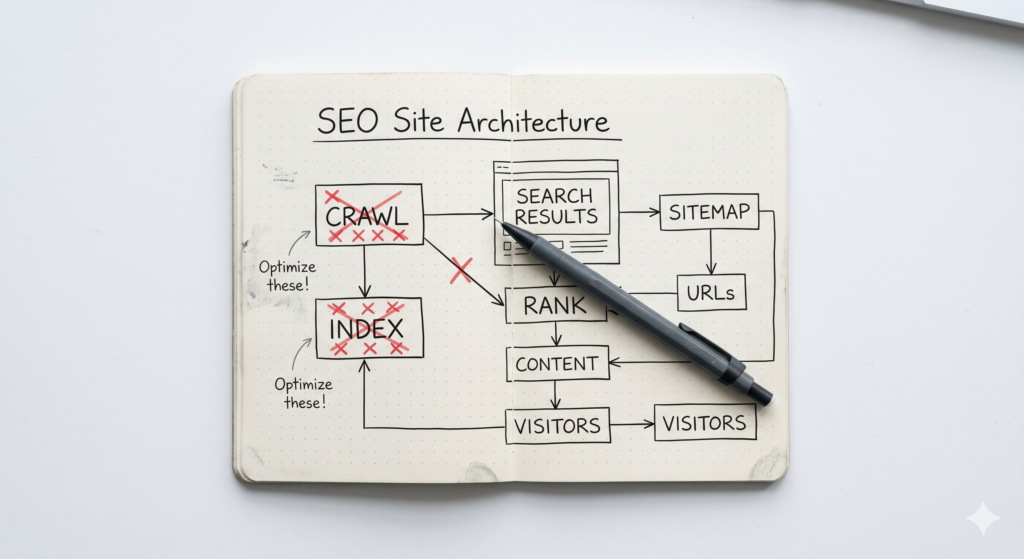
One misconfigured tag can remove your entire site from Google overnight, and you won’t receive any warning when it happens.
How to fix it:
In Google Search Console, navigate to the Coverage report and look for pages flagged as “Excluded — noindex tag detected.” If your key pages appear there, the tag needs to be removed.
To check manually, right-click on any page, select “View Page Source,” and search for the text noindex. If you find <meta name=”robots” content=”noindex”> in the <head> section of your homepage or key pages, that’s the culprit.
In most CMS platforms (WordPress, Wix, Squarespace), this setting lives under SEO settings or privacy settings. In WordPress specifically, there is a checkbox under Settings > Reading labelled “Discourage search engines from indexing this site” — if this is checked, uncheck it immediately.
Once removed, request re-indexing via Search Console for each affected page.
Reason 3: Your Site Has Slow Load Speeds That Push It Below the Threshold
Page speed is a confirmed Google ranking factor, and sites that load slowly are either ranked lower or excluded from competitive SERPs entirely. According to Google’s own research, 53% of mobile users abandon a site that takes longer than three seconds to load. Search engines know this, and they factor it in.
For SMBs, slow sites are often caused by uncompressed images, outdated hosting, bloated themes, or too many third-party scripts running on page load.
How to fix it:
Run your site through Google PageSpeed Insights. The tool gives your site a score from 0 to 100 and lists every specific issue dragging the score down, in order of impact.
The highest-impact fixes are almost always the same: compress and convert images to WebP format, enable browser caching, remove unused CSS and JavaScript, and upgrade hosting if your server response time exceeds 200ms.
If your site runs on WordPress, plugins like WP Rocket or Perfmatters handle most of these fixes without requiring a developer. For other platforms, the PageSpeed report will give you the exact recommendations to pass to whoever manages your site.
A site loading in under two seconds on mobile is the target. Anything above three seconds is actively costing you rankings.
Reason 4: Your Website Has No Backlinks or Domain Authority
Google treats backlinks as votes of confidence. When another website links to yours, it signals that your content is worth referencing. A site with zero backlinks from external sources has no accumulated trust in Google’s eyes, which makes it extremely difficult to rank for competitive keywords regardless of how well-written the content is.
This is why new sites often take six to twelve months to gain meaningful organic traction. Authority is built over time and cannot be manufactured overnight.
How to fix it:
Start with the backlinks you can earn quickly and legitimately: local business directories (Google Business Profile, Yelp, Bing Places), industry associations, chamber of commerce listings, and supplier or partner websites. These are low-effort, high-legitimacy links that establish baseline authority.
Next, create content that is worth linking to. Data-backed articles, original frameworks, industry guides, and comparison pieces all attract natural backlinks over time. Tabula’s approach to AI-driven content marketing is built around exactly this principle — producing content that earns citations rather than chasing them.
You can also pursue digital PR: writing guest posts for relevant industry publications, contributing expert commentary to journalists via platforms like Help a Reporter Out (HARO), or getting featured in roundup articles.
Track your backlink profile using free tools like Ahrefs Webmaster Tools or Google Search Console’s Links report. Aim for consistent growth month over month rather than a sudden spike, which can appear manipulative to Google’s algorithms.
Reason 5: Your Content Doesn’t Match What People Actually Search For
Publishing content that doesn’t reflect real search queries is the most common reason a technically healthy website gets no organic traffic. You might rank for your exact business name, but if your pages don’t contain the words and phrases your potential customers actually type into Google, those pages won’t appear for any searches that matter.
This is a keyword alignment problem, and it’s more widespread than most business owners realise. Writing how you talk about your business and writing how your customers search for your business are two different skills.
How to fix it:
Start with Google’s own autocomplete. Type a topic relevant to your business into Google Search and note every suggestion that appears. These are real queries with real search volume. Google’s “People Also Ask” boxes and the “Related Searches” section at the bottom of results pages are equally useful.
For deeper research, Google Search Console’s Performance report shows exactly which queries your site currently appears for, your average position, and your click-through rate. Sort by impressions descending — this tells you which keywords Google is already associating with your content, even if you’re ranking on page four or five.
Once you identify the keywords your audience uses, update your page titles, H1 headings, introduction paragraphs, and meta descriptions to reflect them naturally. Tabula’s guide on how AI helps with SEO covers how to use AI tools to accelerate this research process without losing the human precision that Google rewards.
Avoid forcing keywords in unnaturally. One well-placed instance in the right location outperforms five repetitions scattered across a page.
Reason 6: Technical Errors Are Preventing Google From Crawling Your Pages
Crawl errors occur when Google attempts to access a page on your site and encounters a problem that stops it from reading the content. Common culprits include broken internal links (404 errors), redirect chains that loop back on themselves, pages blocked in your robots.txt file, and duplicate content triggered by multiple URLs resolving to the same page.
Unlike the other reasons on this list, crawl errors often happen invisibly. Your site appears fine to a human visitor, but Google’s bot hits a wall.
How to fix it:
Google Search Console is again your starting point. The Coverage report displays all crawl errors Google has encountered, categorised by error type. The most actionable are:
404 Not Found errors: These occur when a page that used to exist no longer does. Fix them by either restoring the page, redirecting the old URL to the most relevant live page using a 301 redirect, or removing any internal links pointing to the deleted URL.
Redirect errors: A redirect chain happens when URL A sends visitors to URL B, which sends them to URL C. Google recommends keeping redirects to a single hop. Audit your redirects using Screaming Frog (free up to 500 URLs) and collapse any chains down to a direct A-to-C redirect.
Robots.txt blocks: Your robots.txt file, found at yourdomain.com/robots.txt, tells Google which parts of your site to ignore. If key pages or directories are listed under Disallow, Google won’t crawl them. Review the file carefully and remove any blocks that shouldn’t be there.
Duplicate content: When the same content is accessible at multiple URLs (for example, with and without a trailing slash, or via both HTTP and HTTPS), Google doesn’t know which version to rank and may rank neither. Implement canonical tags (<link rel=”canonical”>) on the preferred version of each page to resolve this.
For a full technical audit, Tabula’s team runs systematic crawl diagnostics as part of our SEO services — the kind of check that catches issues that most automated tools miss.
How Long Does It Take for a Website to Show Up on Google?
For a brand-new domain with no prior history, expect Google to begin indexing pages within two to eight weeks after sitemap submission. Ranking meaningfully for competitive keywords typically takes three to six months of consistent content publication and link acquisition. Established domains with authority can see new pages indexed within hours or days.
FAQ
How do I check if my website is indexed by Google?
Search site:yourdomain.com in Google. If your pages appear in results, they are indexed. If no results show, your site is not indexed. You can also check individual pages using the URL Inspection tool in Google Search Console, which shows the last time Google crawled a page and its current index status.
Why does my website show up on Google but not rank well?
Indexing and ranking are separate. A page can be indexed (Google knows it exists) but rank on page ten because it lacks backlinks, doesn’t match search intent closely enough, loads slowly, or faces competition from higher-authority sites. Fixing your ranking requires addressing the specific factor holding it back, not just confirming the page is indexed.
Can a brand-new website rank on Google?
A new website can rank, but it typically takes three to six months before organic traffic becomes meaningful. New domains have no accumulated authority, so Google is cautious about ranking them prominently until they demonstrate relevance and trustworthiness through quality content, backlinks, and positive engagement signals.
Does social media help my website rank on Google?
Social media does not directly influence Google rankings. However, sharing content on social platforms increases the chance that other websites and journalists discover and link to it, which does build authority. Social traffic also generates behavioural signals (time on page, return visits) that can indirectly support rankings over time.
What is the fastest way to get my website on Google?
Submit your sitemap to Google Search Console and use the URL Inspection tool to request indexing for your most important pages. Ensure no noindex tags are blocking your pages, that your site loads quickly, and that your content addresses real search queries. There is no guaranteed shortcut, but these steps give Google everything it needs to index and evaluate your site immediately.
The Fix Is Always Specific
Most websites that aren’t showing up on Google have one or two specific blockers, not six. The six reasons above cover the entire diagnostic landscape — work through them in order, from indexation to technical errors, and you’ll identify the problem quickly.
If you’ve checked all six and your site still isn’t gaining traction, the issue is usually in the gap between what you’ve published and what your audience is actually searching for. That’s a content and keyword strategy problem, and it’s one Tabula is built to solve.
Talk to Tabula about your site’s search visibility and get a clear picture of what’s holding your rankings back.
Visibility isn’t a mystery. It’s a checklist. You just found yours.